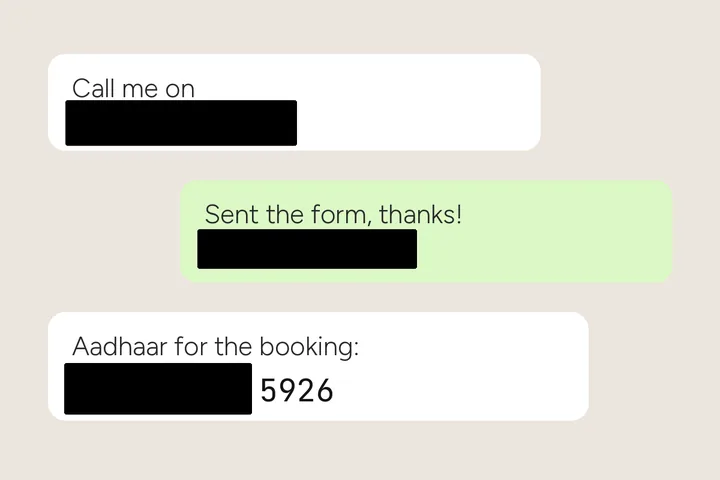
Redaction is cover, not repair
Everything else on this site tries to make text disappear without a trace. Redaction wants the opposite: a reader should see that something was hidden, and nothing about what it was. So this mode never inpaints. It covers the whole box, padding included, with an opaque block, and a letters-only mask is switched off because a cover that traced the strokes would draw the digits it is meant to hide.
Shared screenshots carry more than you think: an order number, a phone number in a chat header, a UPI ID, an email in a signature. Box each one; they are covered in one press.
Covered regions are flattened into the pixels of the saved file. There is no layer to peel back.
Where this mode goes wrong
- Something you did not box.The detector proposes regions, but you decide; a number it missed is not covered.
- JPG around a cover.JPEG adds faint noise at a block's edges; it reveals nothing, but PNG keeps the cover exactly solid.
- Faces and photos.This mode is for text; a face is not lettering and is out of scope here.
What stays on this device
Nothing is uploaded and nothing is kept: the original stays in this tab until you close it, and the saved file has its EXIF dropped unless you choose otherwise.
Questions about redaction
Why cover instead of erasing?
Because erasing is a repair, and a good repair hides that anything was there — while a weak one leaves ghost ink a reader can make out. Covering is honest about what happened and leaves nothing underneath: the block's pixels are the only pixels in the saved file.
Can a blurred number be read back?
Light blur and small-block pixelation of short numbers can sometimes be reversed or guessed. That is why Black, White and Ground are the default covers, and why Pixelate and Blur here never go below a set strength — no more than three blocks across the box's short side, a blur radius of at least half of it — and carry a warning.
How does the Aadhaar preset choose which digits to hide?
You box the whole twelve-digit number. The ink's column profile is split into digit cells; with twelve found, the cover ends between the eighth and ninth digit, and with the printed 4-4-4 spacing found, it ends after the second group — matching the masked-Aadhaar convention of showing only the last four. If neither can be read, the box is split at two thirds and the panel tells you to check.
Is the original kept anywhere?
No. Nothing is uploaded and nothing is stored: the original exists in this tab until you close it. The saved file is decoded again after export and every covered region is measured in it, and EXIF is dropped by default.
Where the job goes next
- Screenshots, by the folder Flat ground and sharp edges, PNG in and PNG out, and the queue for a set of frames is on by default.
- Remove handwriting Pen ink picked by colour, printed type and ruled lines held back, and the paper rebuilt from the page itself.
- ImageTextRemover Draw a box over the lettering, keep the boxes you meant, and get the picture back with the ground painted across them.